 A Modest Internet Empire
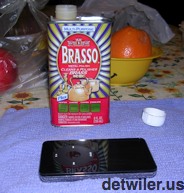
How to repair scratches on iPods or any other glossy plastic electronic screen or case yourself.
When I scratched an iPod screen, here is what I learned while researching repairs. Many folks sell expensive scratch repair kits for glossy plastic screens and cases on electronics like some Apple iPods, laptops, mp3 players, cell phones, even CD and DVD. But you don't need kits. The magic ingredient is Brasso
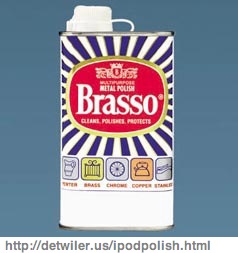
Brasso
Brasso is a metal polisher. It is actually a very mild abrasive. (It is made of petroleum distillates and silica. The distillates are just the medium; the silica does the work.) It is so mild it polishes. It is designed for metal, but it works just as well on glossy, hard polycarbonate plastic, such as some iPods, first and second generation iPhone backs, cell phones, and glossy plastic laptop and electronic cases. It will work on most shiny metals, such as the metal back on iPod touch.
NOTE: This method will NOT work properly on matte finishes on plastic or metal--it can remove the scratch, but will also polish away the matte finish leaving a shiny spot. It will not work on colored or "anodized" aluminum because it will remove the color. It will not work on glass scratches.
You will also need a soft, lint-free cloth. Microfiber
Just put a dab of polish on the scratched area and rub with the cloth. You will have to rub a lot, and rub longer the deeper the scratch. This is by design--if Brasso were any more abrasive, it would scratch rather than polish.
Disclaimers: Before using any polishing product, be sure the polish is suitable the material to be polished and to follow directions on the label. Use this advice at your own risk. I use an iPod for our example, but models change. Newer iPods may use glass screens rather than polycarbonate plastic. iPhones and iPod Touch have a special coating that resists fingerprints; this coating may be removed by polishes. Do not drink Brasso. Never get involved in a land war in Asia.
Three rules for the best results when polishing scratches on plastic
Some people have complained that using Brasso results in fine swirl marks clouding the surface. I have not had this problem, but here are THREE RULES for best results:
-
Only use a soft, clean cloth. NEVER paper, NOT EVEN facial tissues (e.g., Kleenex). Paper contains fiber that may scratch your device more. microfiber
- Vary your rubbing pattern as you go. For example, do not rub in a simple circle in the same place for the entire time. Just like sanding wood, even a light abrasive will show swirl marks if you keep rubbing the same spot the same way. Spiral around the entire surface to be polished in a random manner.
- Brasso is intended to work best on light scratches. Deep gouges take more rubbing, and hard, concentrated rubbing on a single deep scratch may make violation of rule #2 more likely. Don't try to rub out every deep scratch completely. Use Brasso to takeout light scuff and scratches, and diminish deeper blemishes, but don't expect it to grind out everything.
My personal experience polishing scratches on an iPod
Update: Since preparing this tutorial, I have also used Brasso to remove scratches from the shiny metal back of the pictured iPod as well as an iPod touch.
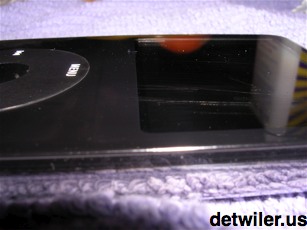 cloth on hand.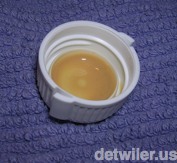
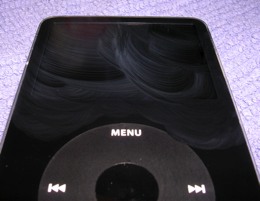
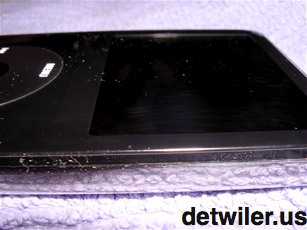
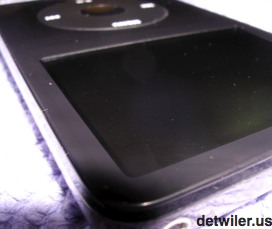 cloth. It wiped off easily. It took about 15 minutes of continuous rubbing to get the iPod into the condition pictured. I was able to repair most of the scuff; a deeper scratch that was within the scuff remains, but it is much less evident. It would need some more rubbing. But the visually distracting scuff is all but gone, and I was satisfied with that for now.
iPOD POLISHING TIPS
- It takes a while. Just trust me and keep rubbing.
- Brasso has fumes that may bother some. Use it with plenty of ventilation.
- Brasso works for the smooth parts of your iPod. Any matte-finish, textured parts, such as the click wheel on the iPod nano, the on/off switch on the iPod shuffle may get stained using this method. I recommend keeping the polish away from any non-shiny parts of your iPod.
- This also works on the screen and the shiny metal back of the iPod touch and other models with such a back. It takes longer to buff metal.
- Works on Compact Discs and DVD's too--most hard, smooth, shiny plastics!
FEEDBACK
We would love to hear your comments and questions. Contact us
For more profound revelation, visit the other pages of Detwiler.us.